# dify
由于此项目有嵌入`dify`部分功能的需求,针对`dify`源码做了部分调整。可以使用`iframe`的方式嵌入`dify`,并支持对其`样式`与`脚本`的调整。
```vue
```
## dify相关修改记录
### 2024-12-12 dify 配置跨域
为了解决无界`微前端跨域`的问题,修改了dify的配置文件。
`nginx`配置文件目录: `/data/disk2/llm_platform/dify/docker/nginx/conf.d`
`nginx`配置文件
修改:`default.conf.template`文件,添加如下内容:
添加内容如下:
```
add_header 'Access-Control-Allow-Origin' '*';
add_header 'Access-Control-Allow-Methods' '*';
```
最终结果如下:
```
# Please do not directly edit this file. Instead, modify the .env variables related to NGINX configuration.
server {
listen ${NGINX_PORT};
server_name ${NGINX_SERVER_NAME};
add_header 'Access-Control-Allow-Origin' '*';
add_header 'Access-Control-Allow-Methods' '*';
location /console/api {
proxy_pass http://api:5001;
include proxy.conf;
}
location /api {
proxy_pass http://api:5001;
include proxy.conf;
}
location /v1 {
proxy_pass http://api:5001;
include proxy.conf;
}
location /files {
proxy_pass http://api:5001;
include proxy.conf;
}
location / {
proxy_pass http://web:3000;
include proxy.conf;
}
# placeholder for acme challenge location
${ACME_CHALLENGE_LOCATION}
# placeholder for https config defined in https.conf.template
${HTTPS_CONFIG}
}
```
然后执行:`docker restart docker-nginx-1`重启容器即可。
### 2024-12-13 dify 添加事件监听,支持iframe样式和脚本插入
在`大模型2.0`中`嵌入dify`项目时,初始使用`微前端`方式,但是使用微前端时,发现dify的前端使用的是`服务器端渲染`框架`nextjs`,在加载dify项目时,会有报错,经过查询资料得知,`无界`当前不支持`服务器端渲染(SSR)`,无界嵌入`next.js`或者`nuxt.js`都没有好的解决方案。
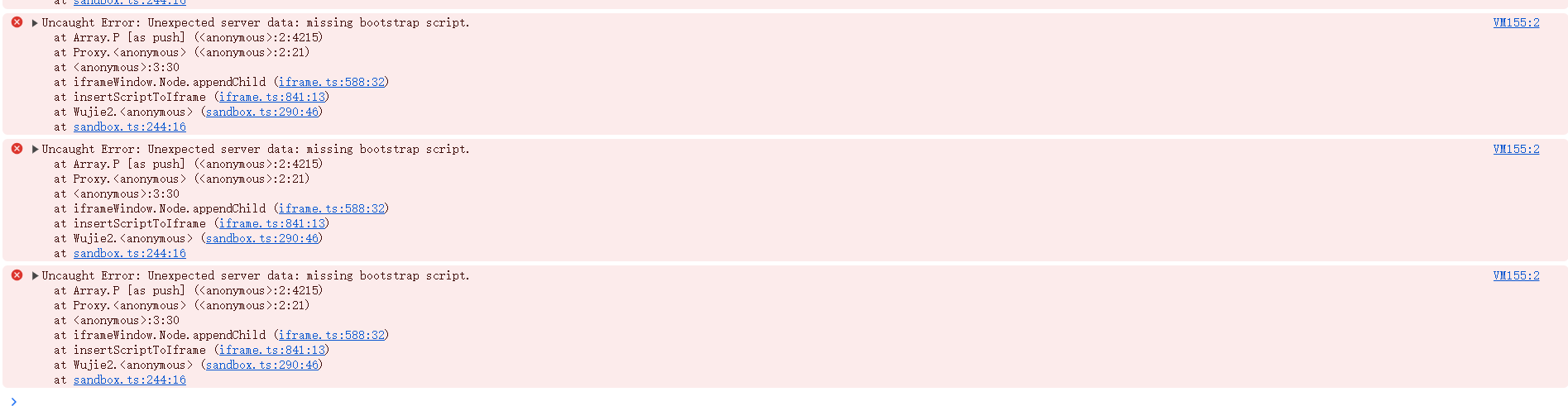
为了解决此问题,考虑了两个方案:
1. 调整为使用`iframe`进行嵌入,通过`postMessage`进行通信,调整样式和脚本。此方案需要调整`dify`的源码,与初衷有些许背离。
2. 继续使用微前端方式,但是需要修改`无界`的源码,调整起来比较困难。
由于修改无界的源码,需要的时间较多,暂时使用`iframe`方式嵌入。此方案需要调整`dify`的源码。下方记录对`dify`的修改。
#### 修改位置
**文件1**
文件远程地址:`http://192.168.20.116/_next/static/chunks/app/layout-4c8b096bae21994c.js`
文件服务器路径:`/data/disk2/llm_platform/dify/docker/web/.next/static/chunks/app/layout-4c8b096bae21994c.js`
**文件2**
文件远程地址:`http://192.168.20.116/_next/static/chunks/app/(commonLayout)/layout-f8be35226350c774.js`
文件服务器路径:`/data/disk2/llm_platform/dify/docker/web/.next/static/chunks/app/(commonLayout)/layout-f8be35226350c774.js`
**文件3**
文件远程地址:`http://192.168.20.116/_next/static/chunks/app/signin/layout-a9277f33772c3201.js`
文件服务器目录位置:`/data/disk2/llm_platform/dify/docker/web/.next/static/chunks/app/signin`
#### 修改内容
在上述列出的js文件末尾添加下方脚本:
> 此处的修改接收`message`,并进行相应的`css`和`js`的操作。
```js
function handleMessage(event) {
const data = event.data;
try{
const dataInfo = JSON.parse(event.data);
const type = dataInfo.type;
const value = dataInfo.value;
if(type === 'insertStyle'){
// 插入样式表
const ele = document.createElement('style');
ele.innerHTML = value;
document.head.appendChild(ele);
}else if(type === 'insertScript'){
// 插入脚本
const ele = document.createElement('script');
ele.innerHTML = value;
document.head.appendChild(ele);
}else{
// 其他
}
}catch(err){
console.log('自定义事件出错');
}
}
window.addEventListener("message", handleMessage, false);
```