# Bubble menu
The bubble menu refers to the UI menu that pops up when the user selects a piece of text, as shown in the figure below:
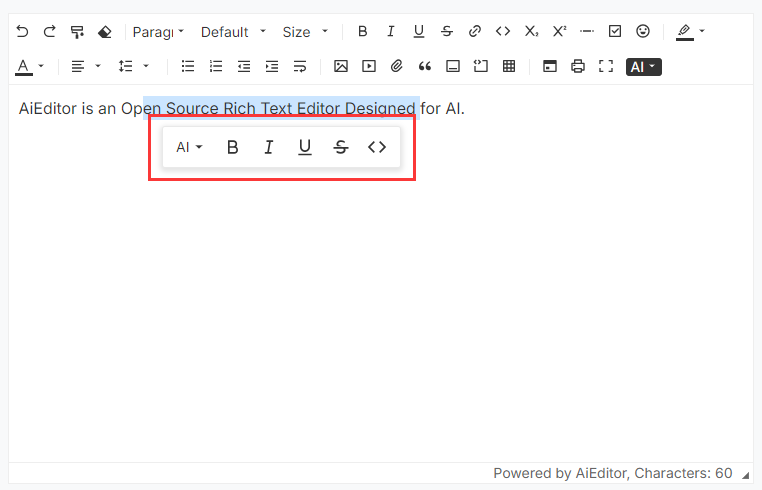
## Menu configuration
In AIEditor, we can configure the bubble menu through `textSelectionBubbleMenu`, the sample code is as follows:
```typescript
new LinwitDocEditor({
element: "#aiEditor",
content: 'LinwitDocEditor is an open source rich text editor for AI.',
textSelectionBubbleMenu: {
enable: true,
items: ["ai", "Bold", "Italic", "Underline", "Strike", "code", "comment"],
},
})
```
- **enable**: Whether to enable the bubble menu
- **items**: Menu items of the bubble menu (configuration is not case-sensitive)
>Note: The configuration of "comments" for the above ** items ** is only supported in the Pro version (not currently supported in the open source version).
## Customize Bubble menus
You can use the above **items**, just pass in a `BubbleMenuItem` configuration, the sample code is as follows:
```ts
new LinwitDocEditor({
element: "#aiEditor",
placeholder: "Click to enter content...",
content: 'LinwitDocEditor is an open source rich text editor for AI.',
textSelectionBubbleMenu: {
enable: true,
items: ["ai", "Bold", "Italic", {
id: "visit",
title: "visit-link",
icon: "",
onClick: (editor) => {
window.open("https://aieditor.dev", "_blank")
}
}],
},
})
```
`BubbleMenuItem` Configuration Instructions:
- **id**: The ID of the current menu item, globally unique,
- **title**: The title displayed when the mouse moves over it, supports international configuration. For internationalization configuration, refer to the [Internationalization](./i18n.md) section.
- **icon**: The icon or html content of the menu item. It is recommended to use the icon under https://remixicon.com, which is consistent with AIEditor.
- **onClick**: Listen for click events
## AI Bubble menus 💪
AI floating menu is only supported in the `Pro Version`. After clicking the configured floating menu, the AI dialogue content will pop up directly.
Its configuration is as follows:
```ts
new LinwitDocEditor({
element: "#aiEditor",
placeholder: "Click to enter content...",
content: 'LinwitDocEditor is an open source rich text editor for AI.',
textSelectionBubbleMenu: {
enable: true,
items: ["ai", "Bold", "Italic", {
id:"translate",
icon:" ",
type:"ai",
prompt:"Help me translate the following content into English: {content}"
}],
},
})
```
> Note: In the above configuration, `type: "ai"` is a fixed value and cannot be changed to other content, otherwise it will conflict with `Customize Bubble menus`.